Command line
The cadboss command line
cargo install cadboss-cli installs the cadboss binary. Each section below runs one subcommand on plant.dxf, a copy of the demo drawing in the repository, and shows its output as printed.
cadboss info
The drawing in seven lines.
Format, units, layers, blocks, layouts, entities and extents.
$ cadboss info plant.dxf
Format: DXF AC1032
Units: Millimeters
Layers: 7
Blocks: 3
Layouts: 3 (Model, Layout1, Sheet 1)
Entities: 15
Extents: (0, 0) to (12500, 8000)
cadboss text
One text item per line.
--group picks one of title-block, annotations, names, attributes, references or all, the default, which prints every group under a # group header. --layout NAME keeps one layout’s text; with it, only title-block, annotations, attributes and references are shown.
Line breaks inside an item become spaces: the four-line MTEXT note on the NOTES layer prints as one line.
$ cadboss text plant.dxf --group title-block
DRAWN
CHECKED
SCALE
REV
$ cadboss text plant.dxf --group annotations
P
P
6000
300+0.1/-0.2
12000
NOTES: 1. ALL DIMENSIONS IN MILLIMETRES. 2. PIPING TO PIPE CLASS 1A. 3. P-102 IS THE STANDBY UNIT, SEE DATASHEET § 4.
PUMP ROOM
$ cadboss text plant.dxf --group attributes --layout Model
TAG=P-101
DUTY=DUTY
TAG=P-102
DUTY=STANDBY
$ cadboss text plant.dxf --group names
0
WALLS
EQUIPMENT
PIPING
DIM
NOTES
TITLE
PUMP
TITLEBLOCK
SITE-PLAN
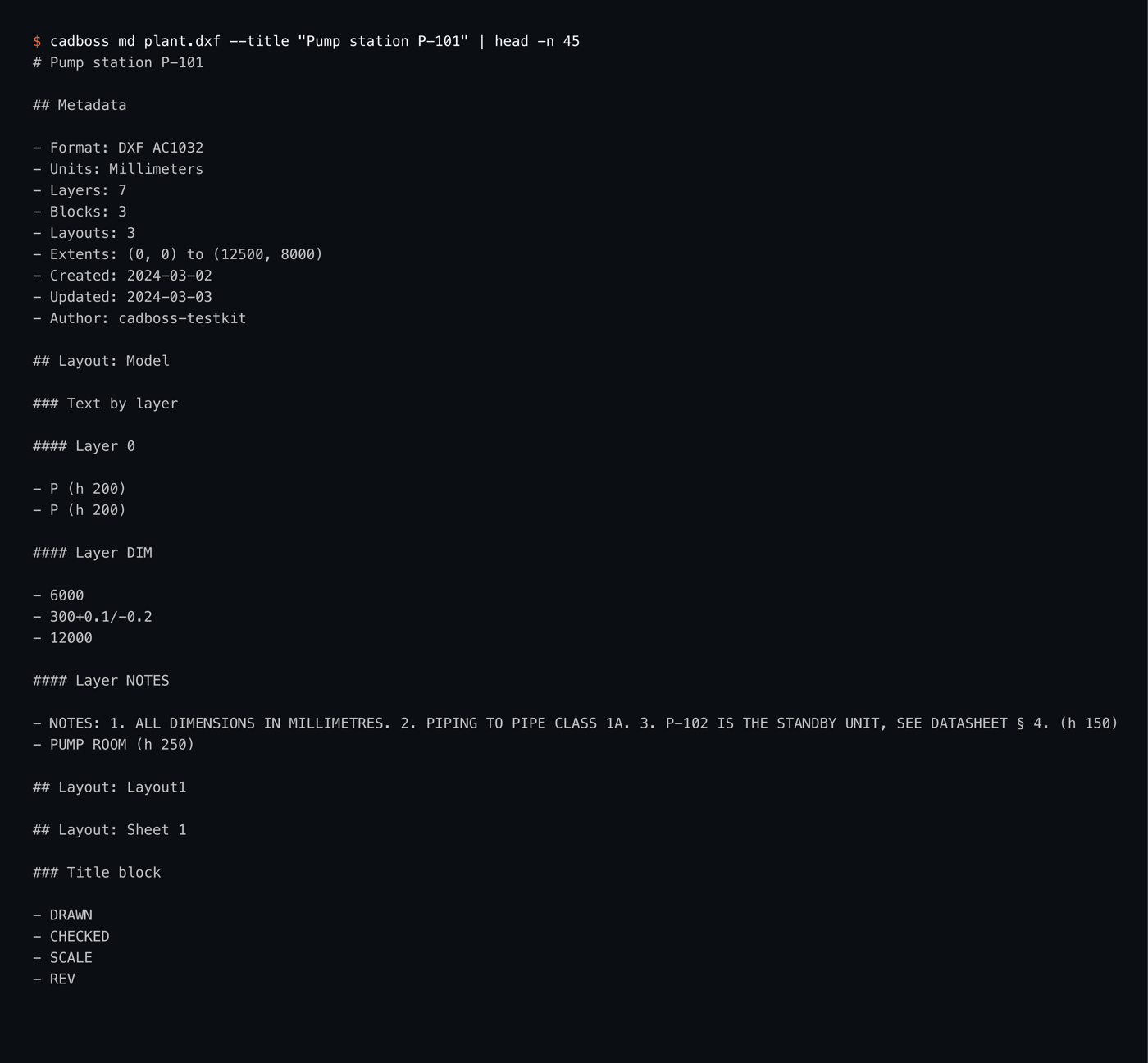
cadboss md
Markdown for a search index.
The metadata list, then each layout’s text grouped by layer with heights, its title block, and after the layouts the entity counts, the names, the attributes and the references. --title sets the top heading; it defaults to the file stem. The screenshot stops after the title block of Sheet 1.
cadboss json
The whole document as JSON.
The same text groups plus the metadata (version, codepage, units, author, created and updated dates, extents, per-type entity counts), the layer and layout tables, the block names and the report. --compact prints it on one line.
--entities adds one array per layout with every decoded entity, written as it is decoded: lines, polylines with bulges, arcs, circles, inserts with their transform, text, dimensions, images. --layout limits it to one layout. The second command below picks one entity out of that export with q.
$ cadboss json plant.dxf | head -n 9
{
  "metadata": {
    "format": "Dxf",
    "version": "AC1032",
    "codepage": "ANSI_1252",
    "units": "Millimeters",
    "author": "cadboss-testkit",
    "created": 2460371.5,
    "updated": 2460372.5,
$ cadboss q plant.dxf '.entities.Model[6]' --entities --layout Model
{
  "common": {
    "handle": 320,
    "layer": "PIPING",
    "layout": "Model",
    "color": 256,
    "hyperlink": "https://example.com/specs/pipe-class-1A.pdf"
  },
  "kind": {
    "Line": {
      "start": {
        "x": 3000.0,
        "y": 4300.0,
        "z": 0.0
      },
      "end": {
        "x": 3000.0,
        "y": 7500.0,
        "z": 0.0
      }
    }
  }
}
cadboss q
jq over the drawing.
cadboss q FILE PROGRAM runs a jq program over the same JSON as json, including --entities and --layout, without writing it to disk. -r prints strings raw.
q holds the whole JSON tree in memory, so q --entities materializes every entity of the selected layouts. For large files, pipe json --entities to a streaming tool instead.
$ cadboss q plant.dxf '.metadata.entity_counts | map("\(.[0])=\(.[1])") | join(" ")' -r
INSERT=4 DIMENSION=3 LINE=3 ARC=1 IMAGE=1 LWPOLYLINE=1 MTEXT=1 TEXT=1
$ cadboss q plant.dxf '.text.annotations[] | select(.source == "Dimension") | .text' -r
6000
300+0.1/-0.2
12000
$ cadboss q plant.dxf '.report'
{
  "skipped": [],
  "unlisted": 0
}
cadboss layouts, cadboss layers
Two tables, tab separated.
layouts prints name, kind and entity count per layout. layers prints name, color and flags per layer: frozen, off, locked or -.
$ cadboss layouts plant.dxf
Model	Model	14
Layout1	Paper	0
Sheet 1	Paper	1
$ cadboss layers plant.dxf
0	7	-
WALLS	7	-
EQUIPMENT	3	-
PIPING	5	-
DIM	1	-
NOTES	2	-
TITLE	7	-
cadboss obj
The raw group codes of one handle.
cadboss obj FILE HANDLE prints the group code and value pairs of the entity or object with that hex handle. Handle 140 is the piping line that carries the PE_URL hyperlink. The JSON export writes handles as decimal numbers, so the same line appears there as 320.
$ cadboss obj plant.dxf 140
0	LINE
5	140
330	109
100	AcDbEntity
8	PIPING
100	AcDbLine
10	3000.0
20	4300.0
30	0.0
11	3000.0
21	7500.0
31	0.0
1001	PE_URL
1002	{
1000	https://example.com/specs/pipe-class-1A.pdf
1002	}
cadboss skill
A skill for Claude Code.
cadboss skill install writes the bundled skill to ./.claude/skills/cadboss/SKILL.md, or to ~/.claude/skills/cadboss/SKILL.md with -g. It teaches the agent the commands and the output. cadboss skill show prints it.
$ cadboss skill install
installed ./.claude/skills/cadboss/SKILL.md
$ cadboss skill show | head -n 4
---
name: cadboss
description: Use when reading, extracting text or metadata from, or exploring CAD files with the cadboss CLI.
---
--budget KEY=VALUE
Caps that stop the reader and say so.
Every command takes --budget KEY=VALUE, repeatable. When a cap is reached the reader stops there, keeps what it read and reports what it skipped. The defaults come from Budget::default() in cadboss-core.
| Key | Caps | Default |
|---|---|---|
| max_bytes | Size of the input file | 500 MiB |
| max_tokens | Tokens on the tape | 64 000 000 |
| max_entities | Decoded entities | 2 000 000 |
| max_layouts | Paper layouts; the model layout is always kept | 200 |
| max_nesting | Insert levels, model space counted as level 0 | 64 |
| max_string_bytes | Length of one string | 1 MiB |
With max_entities=5, info counts the entities it decoded and reports the rest; the Report: line is part of its output and the warning: line goes to stderr. A file larger than max_bytes is not read at all.
$ cadboss info plant.dxf --budget max_entities=5
Format: DXF AC1032
Units: Millimeters
Layers: 7
Blocks: 3
Layouts: 3 (Model, Layout1, Sheet 1)
Entities: 6
Extents: (0, 0) to (12500, 8000)
Report: 4 entities skipped (entity_limit)
warning: 4 entities skipped (entity_limit)
$ cadboss info plant.dxf --budget max_bytes=4096
cadboss: plant.dxf: max_bytes budget exceeded (limit 4096)
$ echo $?
1
Undecodable text
Bytes instead of a placeholder.
legacy.dxf is plant.dxf with the byte 0x81, which Windows-1252 leaves undefined, in place of the space in PUMP ROOM. text prints a marker with the byte count; the JSON keeps the bytes in base64 under _bytes, and Python returns them as bytes.
$ cadboss text legacy.dxf --group annotations | tail -n 1
[non-decodable text, 9 bytes]
$ cadboss q legacy.dxf '.text.annotations[-1].text'
{
  "_bytes": "UFVNUIFST09N"
}
Exit codes
Three exit codes for scripts.
| Code | Meaning |
|---|---|
| 0 | The file was read. Skipped content is a warning on stderr, not an error. |
| 1 | The file cannot be read or is not a DXF, including a file larger than max_bytes. |
| 2 | A bad argument or budget key, an unknown layout, or an invalid jq program. |
Errors are printed on stderr with a cadboss: prefix. An unknown layout lists the available ones.
$ cadboss info notes.txt
cadboss: notes.txt: not a dxf file
$ echo $?
1
$ cadboss text plant.dxf --layout Plan
cadboss: unknown layout: Plan (available: Model, Layout1, Sheet 1)
$ echo $?
2
$ cadboss q plant.dxf '.text.'
cadboss: invalid jq program: expected key end of program
$ echo $?
2
$ cadboss info plant.dxf --budget max_foo=1
cadboss: invalid --budget max_foo=1: unknown budget key (keys: max_bytes, max_entities, max_layouts, max_nesting, max_string_bytes, max_tokens)
$ echo $?
2
The CLI memory-maps the input. Truncating or rewriting that file while cadboss runs can crash the process, so do not point it at a file another program is still writing; copy the file first. The same reader is available from Python and as Rust crates.
FAQ
Questions developers ask.
- Where do warnings go?
- Skipped content is reported on stderr as a warning: line, so stdout stays clean for pipes. cadboss info also prints a Report: line as part of its own output.
- Does a warning change the exit code?
- No. A file that was read exits 0 even when parts of it were skipped; exit code 1 means the file could not be read, 2 means a bad argument, an unknown layout or an invalid jq program.
- Can I point it at a file that is still being written?
- No. The CLI memory-maps the input, and truncating or rewriting that file while cadboss runs can crash the process. Copy the file first.
- What does --threads do?
- Nothing yet. Every command accepts it, and it is reserved for internal parallelism; it is currently unused and defaults to 1.